
Short summary: If an item from a Punjab Sahulat Bazaar order is damaged, missing, or wrong, PSBA accepts complaints and may offer replacement or refund after review. This page explains how to report issues, what evidence to provide, typical timelines, and escalation options.
What this page covers
- How to report a problem (app, phone, email, store)
- What issues are eligible for review
- Evidence required and quick tips to get faster resolution
- Typical timelines and what to expect
- Escalation and legal options
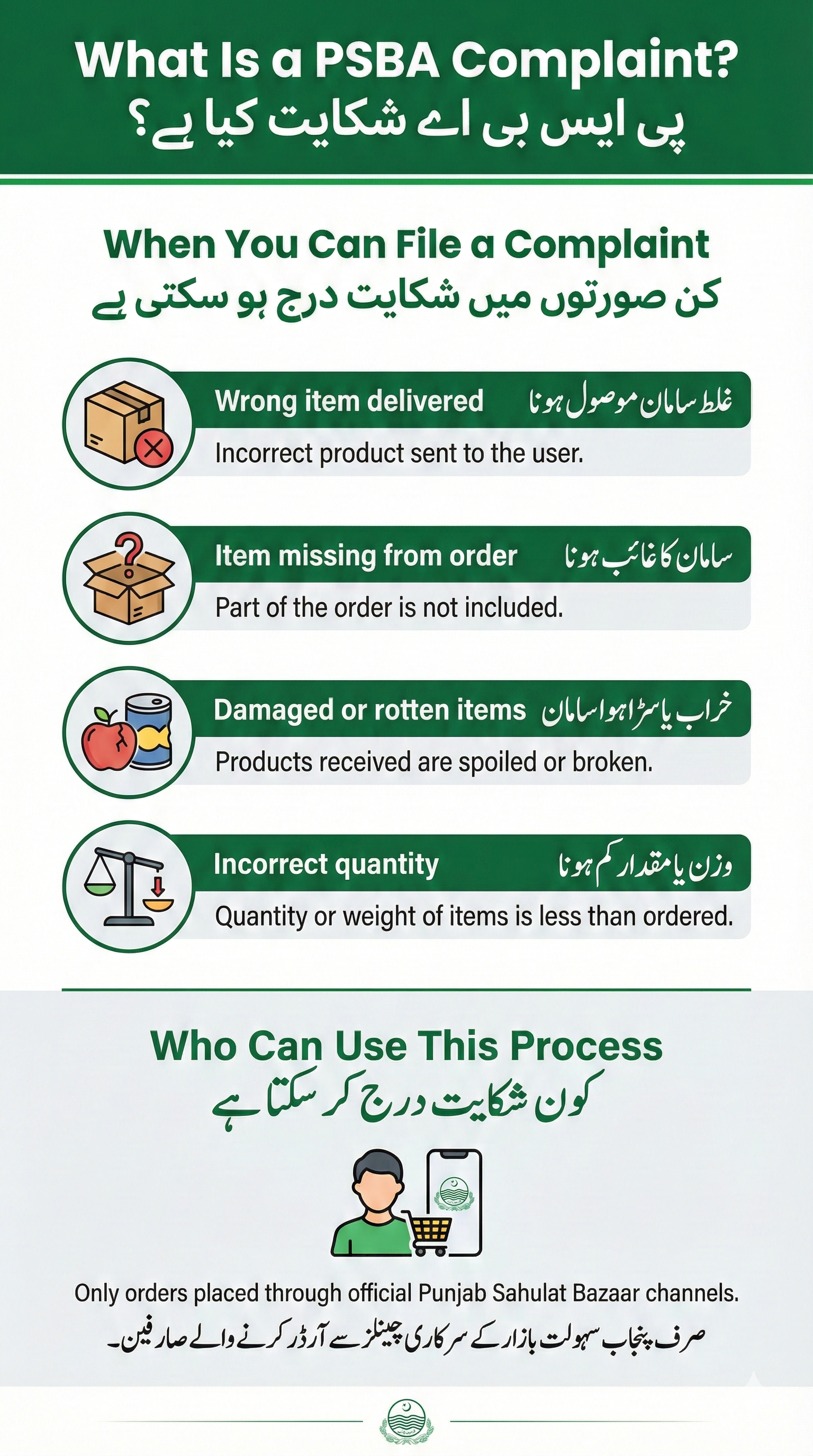
What is a PSBA complaint?
A complaint is a report you make when an order from Punjab Sahulat Bazaar (PSBA) arrives damaged, the wrong item was delivered, an item is missing, or a quality problem exists. PSBA reviews complaints and, where eligible, offers replacement or a refund.
کچھ آسان الفاظ میں
اگر آپ کو سامان خراب، کم یا غلط ملا ہو تو فوراً شکایت درج کریں۔ تصاویر اور آرڈر آئی ڈی شکایت کے حل میں مدد دیتی ہیں۔
Who can use this process
Anyone who ordered through the official PSBA channels (the Sahulat Bazaar app or in-store purchase) and received an order from a PSBA bazaar in Punjab. If you ordered from a private seller or ARY Sahulat Bazar, use their support instead. See brand disambiguation.
What issues PSBA typically accepts
- Wrong item delivered — item differs from order
- Missing item — ordered item not in the bag
- Rotten or clearly damaged produce — visible spoilage on delivery
- Incorrect quantity — less weight or count than ordered
Notes: Technical app issues (crashes, payment gateway errors) are handled separately; see App FAQ.
What PSBA does not usually cover
- General dissatisfaction with subjective quality (unless clear evidence)
- Issues arising from customer storage after delivery
- Orders placed with private vendors or non-PSBA services
How to report a complaint (step-by-step)
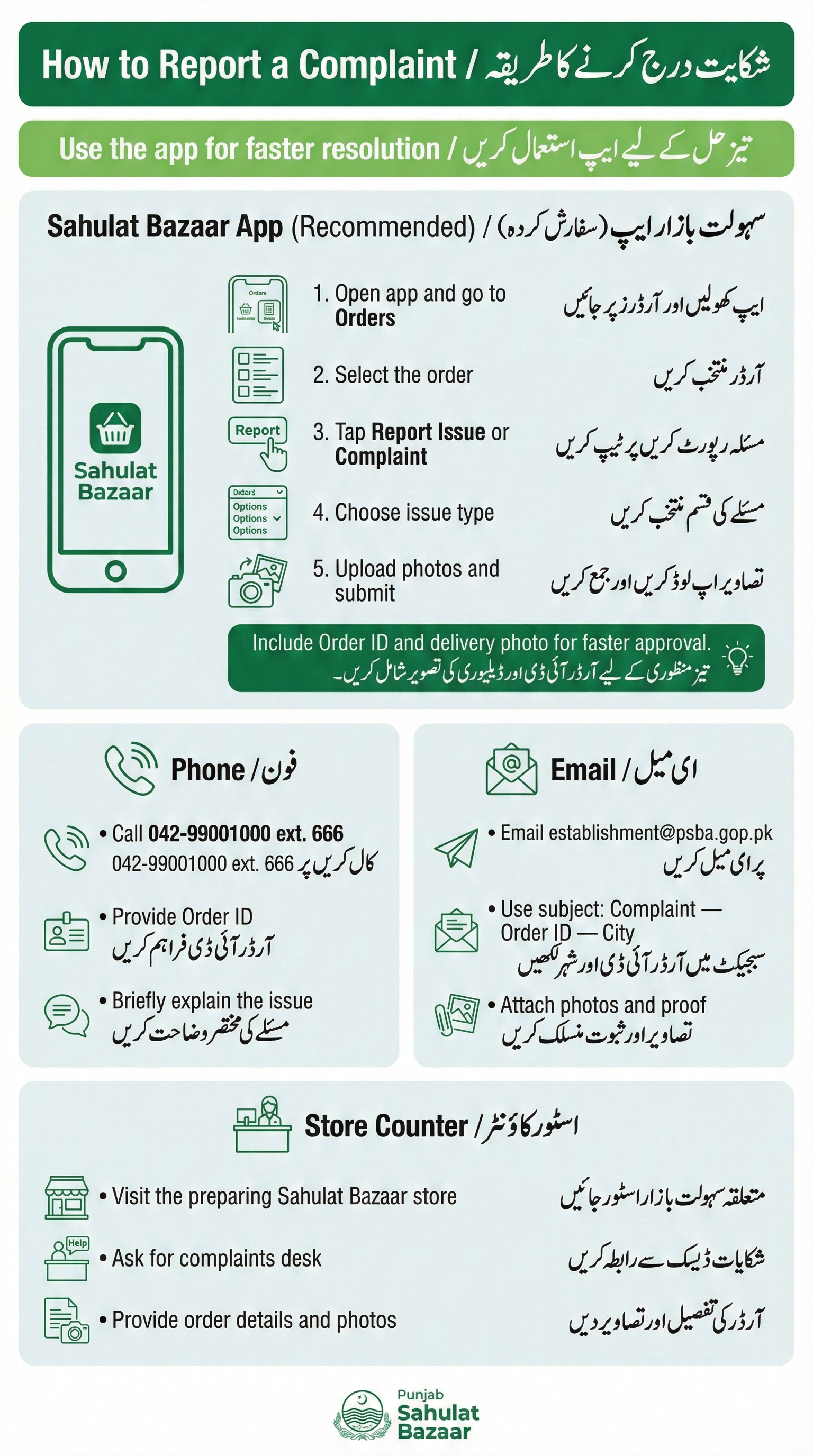
1. In the Sahulat Bazaar app (recommended)
- Open the app → Orders → Select the order.
- Tap “Report Issue” or “Complaint”.
- Choose complaint type (wrong item / damaged / missing).
- Attach clear photos of the item, packaging, and the delivery receipt.
- Write a short note and submit. You will receive a confirmation message.
Tip: Include the Order ID and delivery photo. Photos speed up approval.
2. Phone (if app is not available)
Call PSBA helpline: 042-99001000, ext. 666. Give your order ID and a brief description. Follow-up by email or app where possible.
3. Email
Email: establishment@psba.gop.pk. Subject line suggestion: Complaint — Order [ORDER ID] — [City]. Attach photos and delivery confirmation.
4. At the store counter
Visit the Sahulat Bazaar store where your order was prepared and ask for the complaints desk. Provide order ID, photos, and delivery details. Staff log the complaint into PSBA systems.
5. Escalation (if unresolved)
- Deputy Commissioner (district level) — contact details vary by city
- Ombudsman Punjab — ombudsmanpunjab.gov.pk
- Consumer courts — legal route if administrative escalation fails
Complaint review & resolution flow
- Report received: System assigns a ticket and confirmation is sent.
- Initial check (1–3 days): Support reviews photos and delivery proof.
- Investigation (up to 3–5 days): Staff may contact rider or local bazaar for verification.
- Decision & action (typically 5–14 days): If eligible, PSBA issues replacement or refund. Refunds to bank/wallet may take additional time.
Important: These are typical timelines based on current PSBA practice. Processing time may vary by city and payment method. Early reporting and clear photos improve speed.
Evidence required (checklist)
- Order ID (from app SMS or confirmation)
- Clear photos of the damaged/rotten/wrong item
- Photo of packaging and delivery slip (if available)
- Short description of issue and preferred resolution (refund or replacement)
What to expect after you submit
- PSBA confirms receipt of your complaint (app message, email or phone).
- Investigation may require 2–7 days depending on city load.
- Refunds usually process within 5–14 days after approval; bank transfer delays can extend this.
- If you do not hear back, use the helpline or escalate to Deputy Commissioner / Ombudsman.
User rights & limits
PSBA aims to resolve valid issues, but policies and outcomes can vary by location. The program does not promise specific monetary compensation in all cases. For legal remedies, users may contact consumer courts or Ombudsman Punjab.
Complaint message templates (copy & paste)
App or Email template
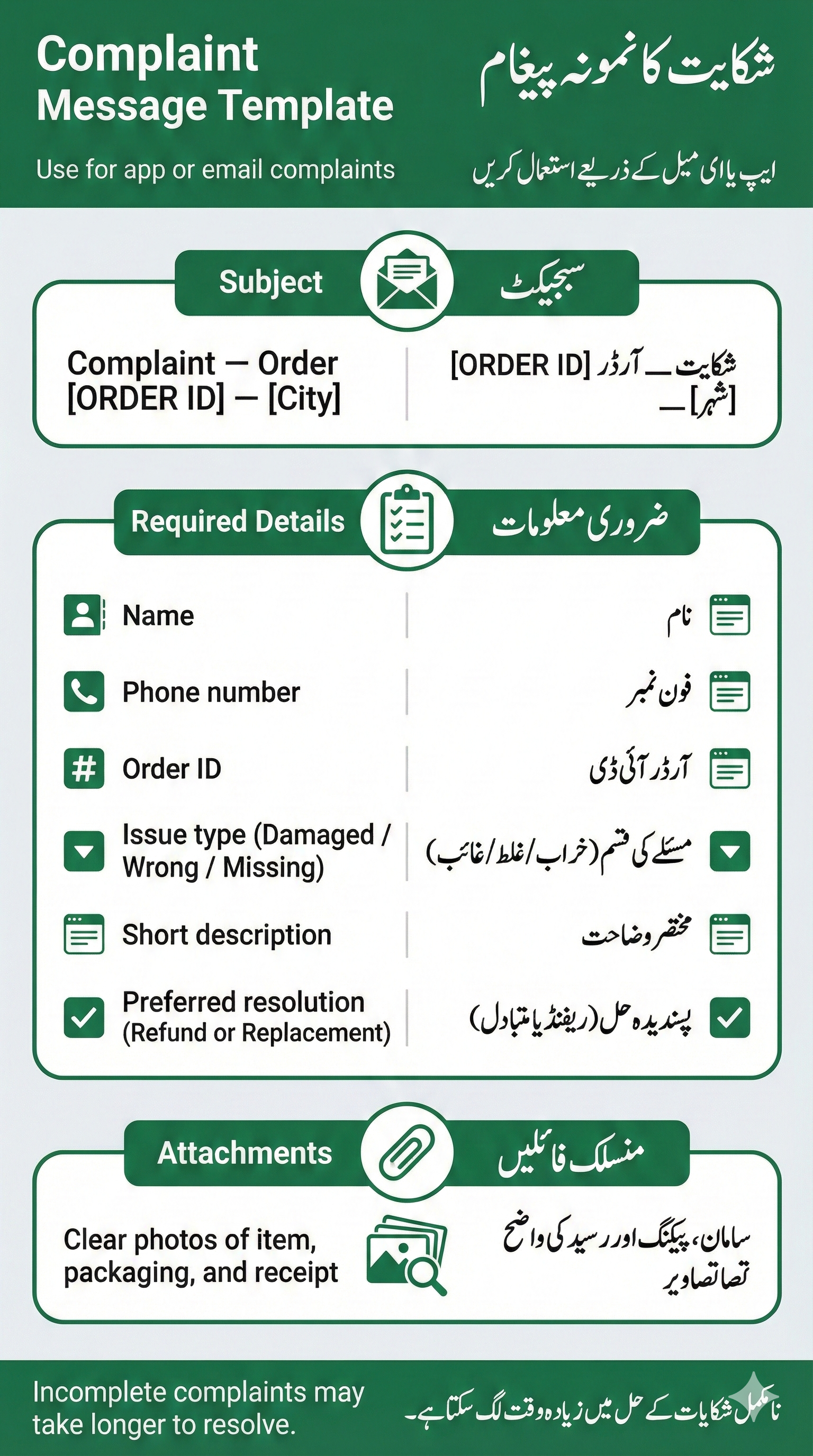
Subject: Complaint — Order [ORDER ID] — [City]
Name: [Your name]
Phone: [Your phone]
Issue: Damaged / Wrong / Missing item (select one)
Details: Short description (what arrived vs what ordered)
Attachments: [photo1.jpg, photo2.jpg]
Preferred resolution: Refund / Replacement
Phone script
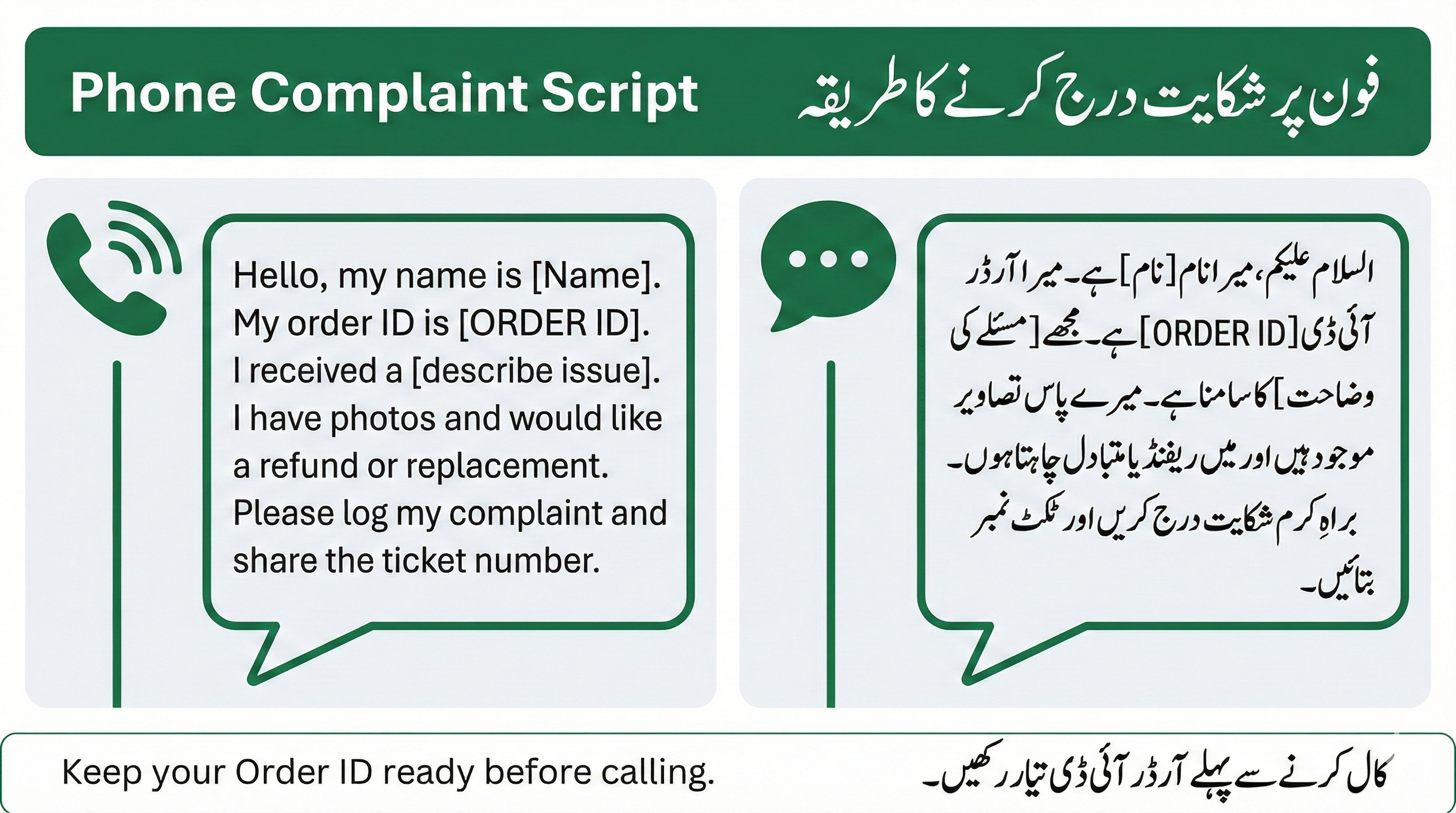
Hello, my name is [Name]. My order ID is [ORDER ID]. I received [describe issue]. I have photos and would like a refund/replacement. Please log complaint and give me the ticket number.
Escalation & legal options
If PSBA response is unsatisfactory after reasonable attempts, you can:
- Contact your district Deputy Commissioner for price or service issues
- File a complaint with Ombudsman Punjab
- Approach consumer courts for legal remedy
Trust & safety signals
- Official body: Punjab Sahulat Bazaars Authority (PSBA)
- Contact: 042-99001000 ext. 666 — establishment@psba.gop.pk
- Official site: psba.gop.pk
- ISO certifications: ISO 9001 & ISO 27001 (verify on transparency page)
Quick FAQs
How soon should I report?
Report as soon as possible. Reporting within 24 hours is recommended because photos are clearer and verification is easier.
Do I always get a refund?
No. Refunds are given after review when evidence supports the claim. PSBA typically refunds eligible issues, but outcomes vary by case and city.
How long for a refund?
After approval, refunds usually take 5–14 days to reach your account or app wallet. Bank transfers can add delay.
Can I call the store directly?
Yes. You can visit or call the store where your order was prepared. Store staff can log a complaint but final resolution happens through PSBA support.
Last updated: January 2026. We test and update contact details regularly — confirm numbers before calling.